This error means Exchange is requiring SMTP authentication, but POPcon uses standard unauthenticated SMTP to deliver mail to Exchange. The fix is to allow anonymous connections on the receive connector.
Exchange 2007 / 2010 / 2013 / 2016
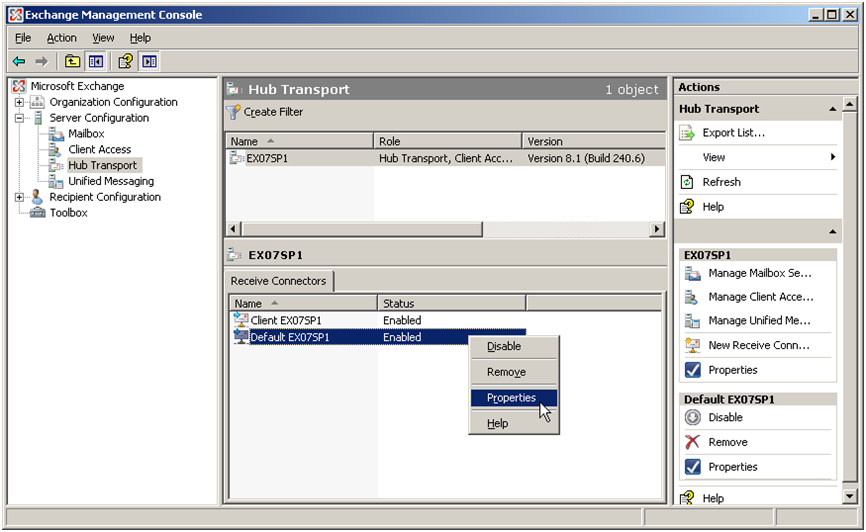
- Open the Exchange Management Console (or Exchange Admin Center).
- Navigate to Server Configuration > Hub Transport > Receive Connectors (or Mail Flow > Receive Connectors).
- Open the "Default [SERVERNAME]" or "Default Frontend [SERVERNAME]" connector.
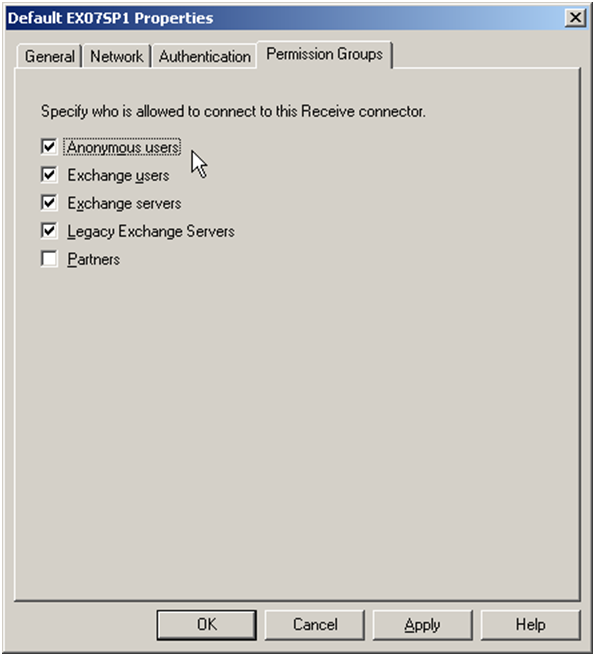
- On the Permission Groups tab, check "Anonymous users".
- Click OK and test again.
Note: Do not use authenticated SMTP to get around this error. With authentication, Exchange shows every email delivered this way as sent by the account that logged in. The receive connector must permit anonymous connections from the POPcon server's IP address, as described in the Exchange configuration guide.
Screenshots — step by step