Exchange receive connectors have a default maximum message size of 10 MB (10240 KB). Increase this as follows:
Exchange Management Console (2007 / 2010)
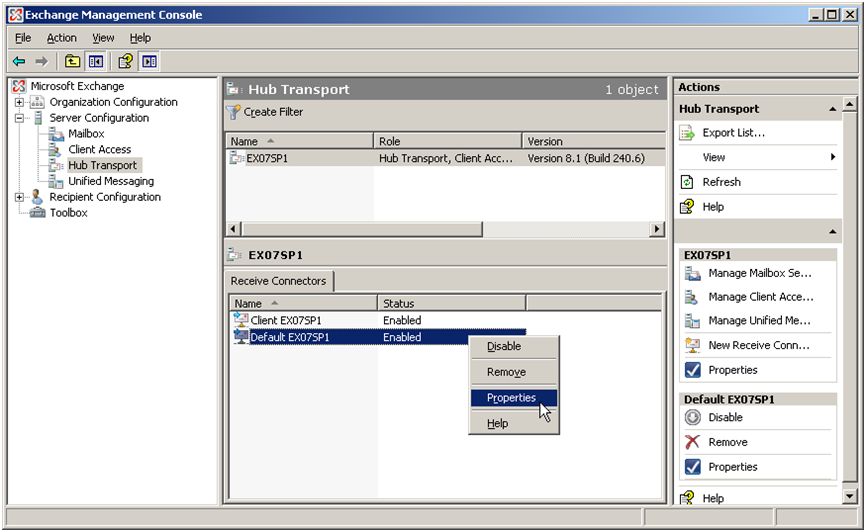
- Go to Server Configuration > Hub Transport > Receive Connectors.
- Open the default receive connector.
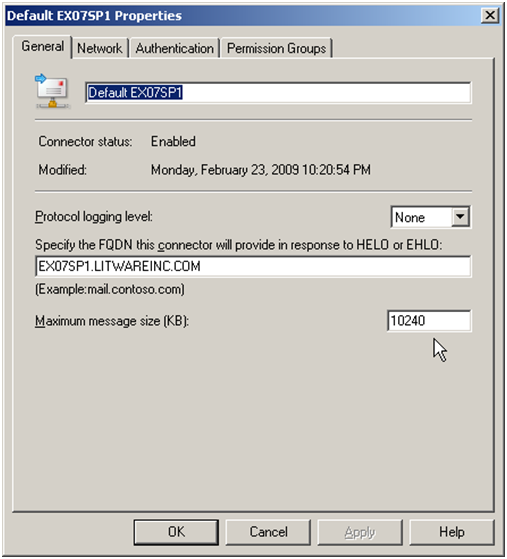
- On the General tab, increase Maximum message size from 10240 KB to your desired limit (e.g. 102400 for 100 MB).
Exchange Management Shell
set-receiveconnector "*default*" -maxmessagesize 100MBYou may also need to increase the limit at the organization level: Organization Configuration > Hub Transport > Global Settings > Transport Settings.
The limits of current Exchange versions (2016, 2019, SE) with Microsoft's default values, and what happens to a message at each of them, are in the guide Messages over 10 MB are not arriving: size limits between the POP3 connector and Exchange.
Screenshots — step by step