POPcon itself handles messages up to 100 MB and beyond — there is no practical size limit in POPcon. The 10 MB restriction is coming from Exchange.
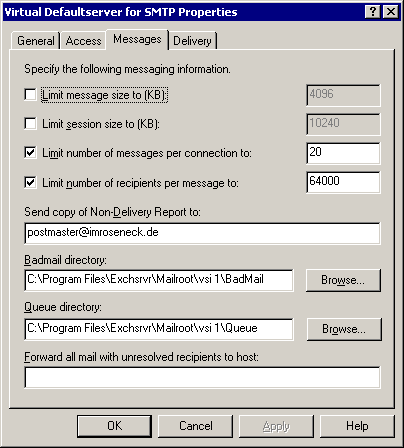
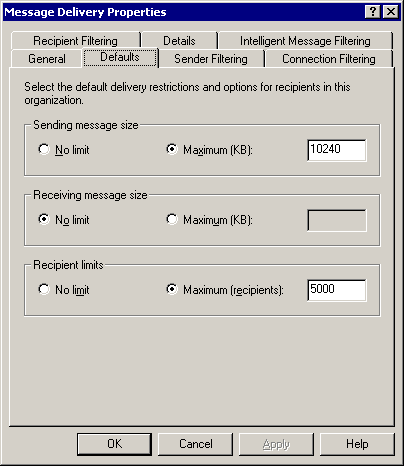
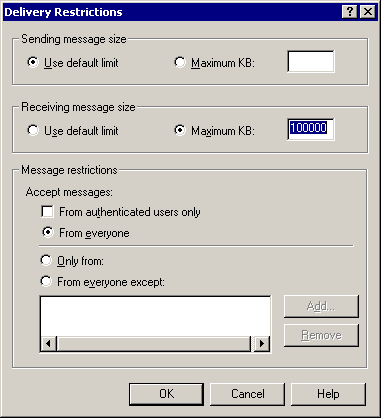
Exchange enforces message size limits in three separate locations — all three must be increased:
- Receive connector: Server Configuration > Hub Transport > Receive Connectors > default connector > Maximum message size
- Organisation-level: Organization Configuration > Hub Transport > Global Settings > Transport Settings > Maximum receive size
- Per-mailbox: Each user's mailbox delivery restrictions in Active Directory Users and Computers
Use the Exchange Management Shell shortcut: set-receiveconnector "*default*" -maxmessagesize 100MB
Which of the limits stops a message, whether the sender is told, and the commands for Exchange 2016, 2019 and SE are explained in the guide Messages over 10 MB are not arriving: size limits between the POP3 connector and Exchange.
Screenshots — step by step